

Every December, Indian Palms holds a Holiday Golf Cart Parade. Neighbors line the streets and decorated carts roll out at dusk. The hard part is timing: on a 5.3-mile loop, some streets wait the better part of an hour.
The brief
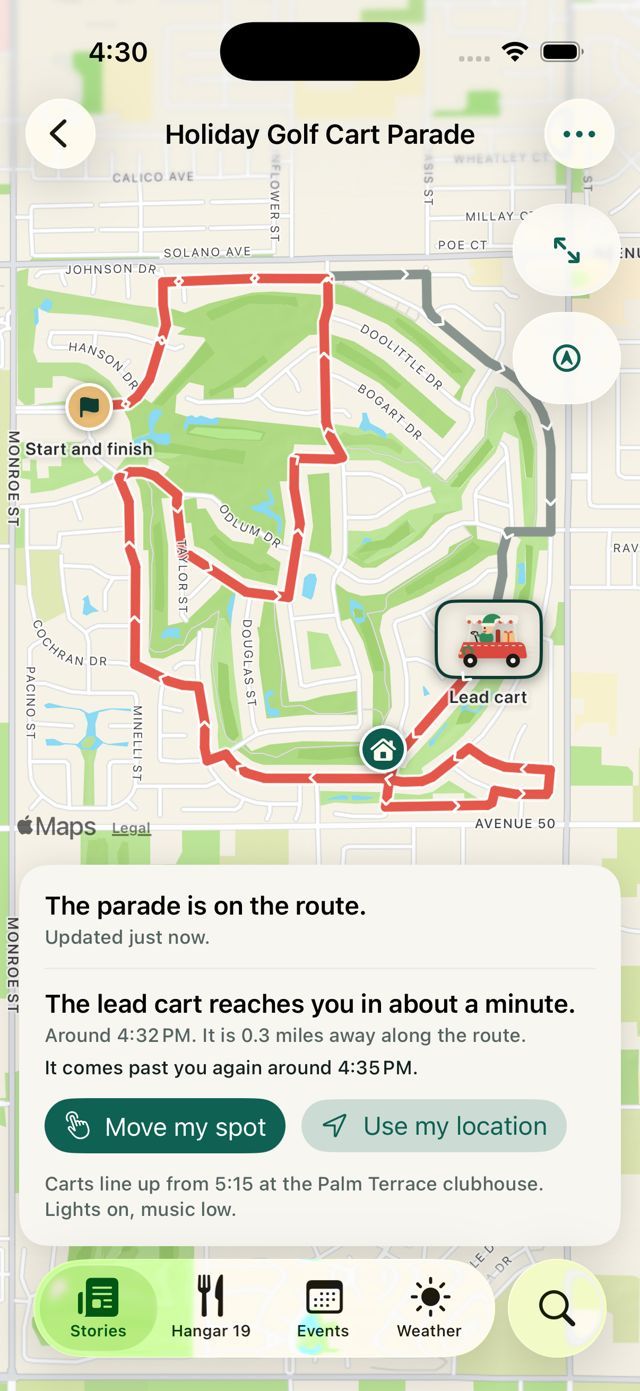
Nothing about the parade should change. No new rules for drivers, no gadgets bolted to carts. One phone rides along in the lead cart, tucked in a pocket, and shares where the parade is. Everyone else can see the route, where the parade is right now, and when it will reach their street.
Nothing about the parade changes. Neighbors just know when to step out.
For neighbors
There are three ways in, and all of them open the same parade map:
- A holiday banner at the top of the app’s front page.
- The parade pinned to the top of the Events tab.
- A QR code on a sign. On an iPhone, scanning opens the map right away, with no download and no sign-in.
Tap your house, use your location or pick a street, and the app shows when the lead cart should reach you. Your spot never leaves your phone. An hour before the start, a small card appears on the Lock Screen by itself and counts down to your spot. Switch on Notify me at 5 minutes and the phone tells you when to head to the curb. When the parade ends, every map says so and the card goes away on its own.
For organizers
Organizers get a short checklist in the app, and nothing reaches neighbors until they say so:
- Date and time: the day, the start, and when carts line up.
- The route: tap each turn and Apple Maps follows the streets.
- A note: one line every neighbor sees, like where to line up.
- Rehearse once: drive it, or watch a pretend cart. Only organizers see practice runs.
- Who leads: pick the lead cart’s phone. Any organizer can take over.
New helpers join from an invite link sent by text or email, type their name and ask to join. An organizer approves or declines. No passwords.
Under the hood
The app is native SwiftUI on iPhone and iPad, with an Android version, on a PocketBase backend. The route screen is built on MapKit. On iOS the countdown is a Live Activity; on Android it’s a notification with a progress bar.
The banner is driven by config, so it can go live before the route exists and switch over without an app update:
eventID     "parade-2026"
dateLabel   "DEC 6 · 6:00 PM"
routeReady  false   // shows "Map coming soon"
showFrom    2026-11-07
Every animation, from the twinkling lights to the bobbing cart, rests when Reduce Motion is on, and the decorative art is hidden from VoiceOver.